
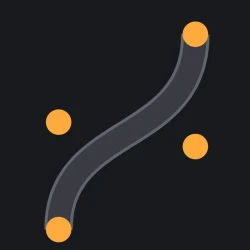
Ribbon
Roblox has no curve primitive. Ribbon adds one: drop four control points and get a continuous road.
What you get
Move a single point and the whole run is re-laid from the curve — same width, same spacing, joints still closed. The editable curve stays in your place.
How it holds up
Surface mode builds roads, paths, walls and track with width, thickness, material, colour and optional kerbs. Repeat clones your own model at exact stud spacing, turned along the curve.
What it does not do
No intersections, no road markings, no meshes, no whole-map generation. Ordinary anchored parts, Ctrl+Z works, nothing runs in your game.
The listing, word for word
BUILD CURVED ROADS THAT STAY EDITABLE.
Making a curved road is only half the problem. Changing it later is the painful part.
Move one control point. Ribbon rebuilds the curve — no duplicating, rotating, resizing or fixing gaps piece by piece.
SURFACE MODE Build roads, paths, tracks, walls and borders. Control width, thickness, spacing, material and colour. Add kerbs or close the loop.
REPEAT MODE Repeat your own Part or Model along the curve — fences, lights, barriers, trees, rocks and modular assets.
Auto Rebuild updates as you edit. Follow Ground fits the curve centreline vertically; it does not conform the full width.
WHEN YOU'RE DONE, BAKE IT. Bake leaves ordinary Roblox geometry. No Ribbon runtime required.
Not a full road-network generator: no automatic intersections, road markings or traffic systems.
Limits: 4,000 pieces per Ribbon / 50,000 estimated Repeat instances.
YOUR MAP WILL CHANGE. YOUR ROAD SHOULDN'T MAKE YOU START OVER.