
Bight
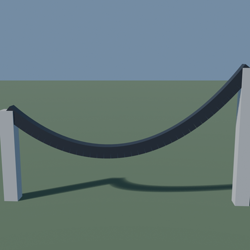
Drag two anchors to the ends. Bight hangs a true catenary cable between them for power lines, suspension bridges and festoon lights.
What you get
Specify visible sag, extra slack or exact cable length. Pieces are divided by arc length so every link stays the same size, including the steeper ends.
How it holds up
At 30% slack across 100 studs, a catenary and the common parabolic shortcut differ by 1.2 studs at the middle. On a slope, Bight also solves the real low point instead of assuming it is centred.
What it does not do
It refuses a cable shorter than the gap, a cable that would hit the floor and hangers below their own deck.
The listing, word for word
Drag two anchors and press Play. Bight builds a true catenary from ordinary anchored Parts, with optional hangers for power lines, suspension or rope bridges, and festoon lights.
Cable geometry only: pylons, bridge deck, physics rope and animation are not included.
A hanging cable is not a parabola. It follows a*cosh(x/a); at 30% slack over 100 studs, the two curves differ by 1.2 studs in the middle.
Set it the way you think: sag for the visible dip, slack as extra length over the gap, or an exact cable length. Bight solves the other values.
Each segment represents the same arc length, rather than the same horizontal distance. On a slope, the lowest point moves away from the middle to the place where the cable is flat.
Bight refuses a cable shorter than its anchor gap; when a floor height is provided, it refuses a curve through it; hangers are refused if the cable falls below their deck.
The result is editable Roblox geometry with no network dependency.