
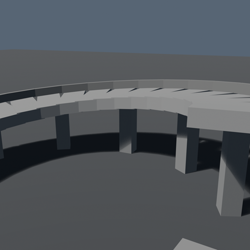
Gyre
Gyre builds a spiral ramp to your upper floor while solving the two constraints that fight each other: driveable grade and clearance under the next turn.
What you get
More turns soften the climb but reduce headroom. If the requested radius cannot satisfy both, Gyre reports the radius, grade and headroom that can.
How it holds up
The grade is solved on the inner kerb, where vehicles actually take the tighter and steeper path. On the default ramp that path is 22% steeper than the centre line.
What it does not do
It is a driveable ramp solver, not a spiral stair: its constraints are grade, radius, width, rise and headroom.
The listing, word for word
A spiral ramp has two constraints that conflict: a gentle grade wants more turns; required headroom wants fewer. Gyre solves both before it builds.
Set rise, radius, width, grade and clearance, then press Play. Gyre creates a continuous segmented ramp from ordinary Parts.
The grade is measured where a driver hugs the inside. The exact release default reads 11.1% at the inner kerb—not the flattering 9.1% centre-line number.
Headroom is deck to deck. The same default leaves 11.40 studs beneath the next revolution.
Impossible inputs do not become bad ramps. If grade and clearance cannot coexist, Gyre reports the turn limit and the radius, grade or headroom that would work.
Release evidence: 25 offline properties plus 23 exact-package Studio checks cover inner travel, overhead clearance and minimum-turn selection.
No network or runtime dependency after generation.
Gallery note: the polished scene is an architectural visual; proof slides show Gyre's deterministic geometry.